Take a look :-D
And some stills:
And my arduino and breadbord, which powers all of this:
Labels
Aarhus
acceleration of time
actuators
animated origami
animated paper
Apolit
Arduino
Arduino input-tool
arduino mega
arm-bot
art exhibit
Artificial Neural Nets
BerryBase
bio-muscle
books
cable management
change in society
change in technology
coca201
Code
computer interface
cyclin74
data
data analysis
design
Digital Urban Living
DIY
Dul
DUL Radio
electronic art
electronic music
embodied interface
etching
flex sensor
flexible circuits
flexible electronics
flexpoint
follow the leader
Friendly Plastic
gothic
hands on
hardware
imagesco
infra red
instructions
Interactive Art
interface
ir sensor
lamp
landbouwbelang
literature
lovecraft
low tech
low temperature thermoplast
max/msp/jitter
Minke Props
mocap
mountains of madness
msp
music
name
Nao
nitinol
nitinol memory wire
off topic
origami birds
PEERS
phidgets
Polymorph
Presentation
Processing
prototype
Radio
rgb led-strip
robotics
sci-fi
sensors
serial
sewing
ShadowCoat
Signal Processing
skiing
smart clothing
sound
sound generation
statistics
Streifeneder
stretch sensor
tangible interface
TEI2012
Theory
Thermoplast
time
translation
Turbocast
Video
visualization
webcam
Wireless
xBee
Posts mit dem Label ShadowCoat werden angezeigt. Alle Posts anzeigen
Sonntag, 27. Februar 2011
RaibowCoat - ShadowCoat with some Color :-)
Labels:
Arduino,
Arduino input-tool,
Code,
imagesco,
mocap,
PEERS,
rgb led-strip,
sensors,
sewing,
ShadowCoat,
smart clothing,
stretch sensor,
Video,
visualization
Mittwoch, 23. Februar 2011
ShadowCoat v 0.02
Before I start rambling, take a look at this video. It’s a demonstration of how the prototype I built can be used as an interface device. I am here demonstrating how it could be used as a mouse. It’s sort of cool, though it sort of takes something really cool and turns it into something banal. While this works, and I know I can get it to work a lot better still, I am hoping to find more intuitive and natural ways of interfacing with computers using this type of technology. (ah, I have already started rambling. Whatever. Watch the video-clip.)(and hear some more rambling)
While my original demo worked quite well, it didn’t have any cable management, so you can spend quite some time figuring out which cable leads where etc. Also the material was quite flimsy and I mounted the Velcro upside down which isn’t helping the material either... also, the pressure fitting was sort of annoying etc. etc. Lots of little things which could be improved.
So on my week off of university, I decided to build a new prototype. Things I wanted to include/change where
- Feedback
- Cable Management
- Tilt of wrist
- Smarter positioning of Velcro
- Sturdier material
Halfway through my work my sewing machine died on me. Well. It didn’t really die. It just sort of protested against sewing cables and electrical equipment to clothing. Guess this isn’t the future it envisioned. But it still is pretty, have a look:
Also I realized that by sheer luck I did a really good job on my first prototype. I had to figure out, often by trial and error, lots of little things which I, by pure coincidence, got right the first time I did it.
But I prevailed :-D. And while I got about half of what I wanted done, it’s a good start and I can definitely build on it, it is much more expandable/upgradeable than my first attempt.
The white thing you se protruding from my arm is an LED strip, so I can have color feedback to my movements.
One of the things which really baffled me was the voltage divider. First time round it just worked, so I didn’t spend much thought or time on it. This time I was not so lucky. So, here is how it should be done:
It is my experience, that the resolution is best when the resistance of R2 is as close as possible to the nominal resistance of the corresponding sensor. I think it might help this project to include opamps for better resolution. I hope to be testing that soon.
I also rewrote all of my code. For the first time in my life I found myself actually appreciating how powerful object oriented programming is. It improves the simplicity of my code drastically, makes it much easier to add sensors, to scale and map them and to just generally have some useful signal flow.
I also figured out that timing is really crucial. I have never really worried about how long it takes to execute a function, but I realized that this is the reason to 90% of errors and bugs I had in my programming, as it can go haywire when the timing between serial and java as well as the communication between objects is out of sync.
Anyway, for the first time I have some code which actually works well enough, that I feel like sharing it. I will figure out the proper format of doing so as soon as I get around to it. In the meantime feel free to contact me at paul dot strohmeier at gmail.com if you would like a look at it.
*
OK, some more random pictures, just because I took them :-D
4 Voltage dividers (schematic of individual one can be found in a pic further up)
Stretch Sensor material from Images
I did this at my grandparents place. This is my gradfather workshop, where I did some soldering.
It’s hard to see, but in case you are interested in how I connected the sensor material with the wired, this sort of gives a clue. I basically just wrap the wire ends around the sensor. If I had a working sewing machine I would pin this to the canvas using criss-cross stitches. As my sewing machine preferred not to support this line of work, I just put electrical tape around it, before sewing it to the shirt by hand.
Anyway - that’s it for now. I really hope I will have time to incorporate the leds and other stuff, but I am afraid it might take a while before I find time to continue work again...
Dienstag, 22. Februar 2011
Montag, 21. Februar 2011
... shadow coat development continues :-D
Mittwoch, 10. November 2010
ShadowCoat Mouse
I procrastinate productivly: I should have been doing other university stuff, instead I thought... "can I use my set-up as a mouse?"
Well, I gave it a shot. I'll coment more on it later.
Montag, 8. November 2010
Introducing: The ShadowCoat (Part 2)
As mentioned before, I have changed my approach a bit, dropping the thermoplastics and going more towards smart clothing direction. I suggest you just take a look at the video. I'll post some pictures and explanations below.
What is most noteworthy in the video is that the rotation of the arm does the two sensor thing I've been talking about (cant wait to see that work on the elbow and shoulder as well). This greatly increased the accuracy of the reading. Also, the software now out-calibrates. This makes the suit ultra-usable. A friend just tried it on and it worked as effortlessly with her as it did with me.
I am still using the stretch sensor by Images. As you can't soldier plastic, I had to find other means of connecting them to cables:
I am sewing them to the construction I prepared yesterday, you can see them in this post.
From my ShadowCoat :-) the sensors connect to voltage dividers which in turn connect to the Arduino Mega...
Here is what the whole thing (and me) look like at the moment. I'm quite happy, cause this worked better than expected :-)
What is most noteworthy in the video is that the rotation of the arm does the two sensor thing I've been talking about (cant wait to see that work on the elbow and shoulder as well). This greatly increased the accuracy of the reading. Also, the software now out-calibrates. This makes the suit ultra-usable. A friend just tried it on and it worked as effortlessly with her as it did with me.
I am still using the stretch sensor by Images. As you can't soldier plastic, I had to find other means of connecting them to cables:
I use multi-core cables (ahh, I know thats not the correct term, but its late...), so sewing over/through/on them is no problem
I am sewing them to the construction I prepared yesterday, you can see them in this post.
I was fooling around with the readings from the stretch sensors earlier and realized, that using two sensors which counteract each other would greatly benefit accuracy and amplitude of the signal. I tried it, and yep, it works :-)
From my ShadowCoat :-) the sensors connect to voltage dividers which in turn connect to the Arduino Mega...
Here is what the whole thing (and me) look like at the moment. I'm quite happy, cause this worked better than expected :-)
Labels:
Arduino,
Code,
data,
hardware,
imagesco,
PEERS,
sensors,
ShadowCoat,
smart clothing,
stretch sensor,
Video
Sonntag, 7. November 2010
Introducing: The ShadowCoat
I havent updated here in a while. I have sort of important news though (well, in a way)
I have decided to call my input device ShadowCoat because well, it copies your moves, like a shadow... and your can wear it, like a coat :-)
Oh, and for those of you who are thinking... "this thing is wearable, but no where near as comfortable as a coat..." ... well, I got out my sewing machine... I am not really ready to present what I am sewing, but I thought I might as well upload some pictures in the meantime :-)
I have decided to call my input device ShadowCoat because well, it copies your moves, like a shadow... and your can wear it, like a coat :-)
Oh, and for those of you who are thinking... "this thing is wearable, but no where near as comfortable as a coat..." ... well, I got out my sewing machine... I am not really ready to present what I am sewing, but I thought I might as well upload some pictures in the meantime :-)
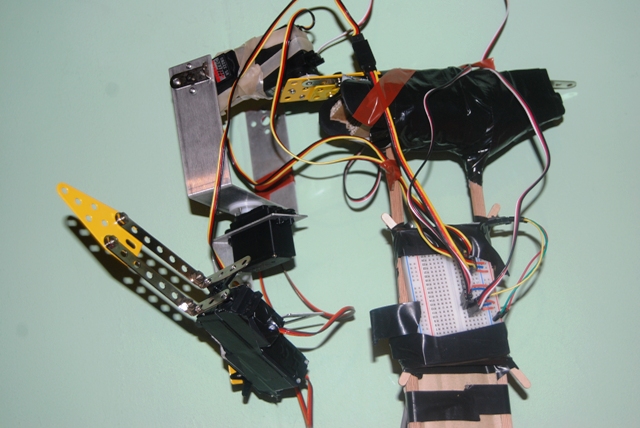
I also built myself a new ArmBot: ArmBot II :-D
... this one is not as pretty (and thats a euphemism), *but* it actually has all the degrees of freedom I am measuring. This is a huge help - having something physical in front of me to controll makes things much clearer to me.
Labels:
arm-bot,
name,
PEERS,
ShadowCoat,
smart clothing
Abonnieren
Posts (Atom)